Calibration v3.1 - Download data, Add columns, Apply Filters, Sort data
🏆 Performance Reviews
Calibration of manager scores to fix any misalignment and misunderstanding of ratings is an important step in the performance review process. To run a calibration process varied types of scores, like self, manager ratings, employee details, Past review scores, and Goal scores are needed.
We are excited to share that all this data can now be easily downloaded from the calibration tab by Review Admins. The calibrated scores can also be entered directly on Peoplebox UI. We hope this will make the calibration process easier and more enjoyable.
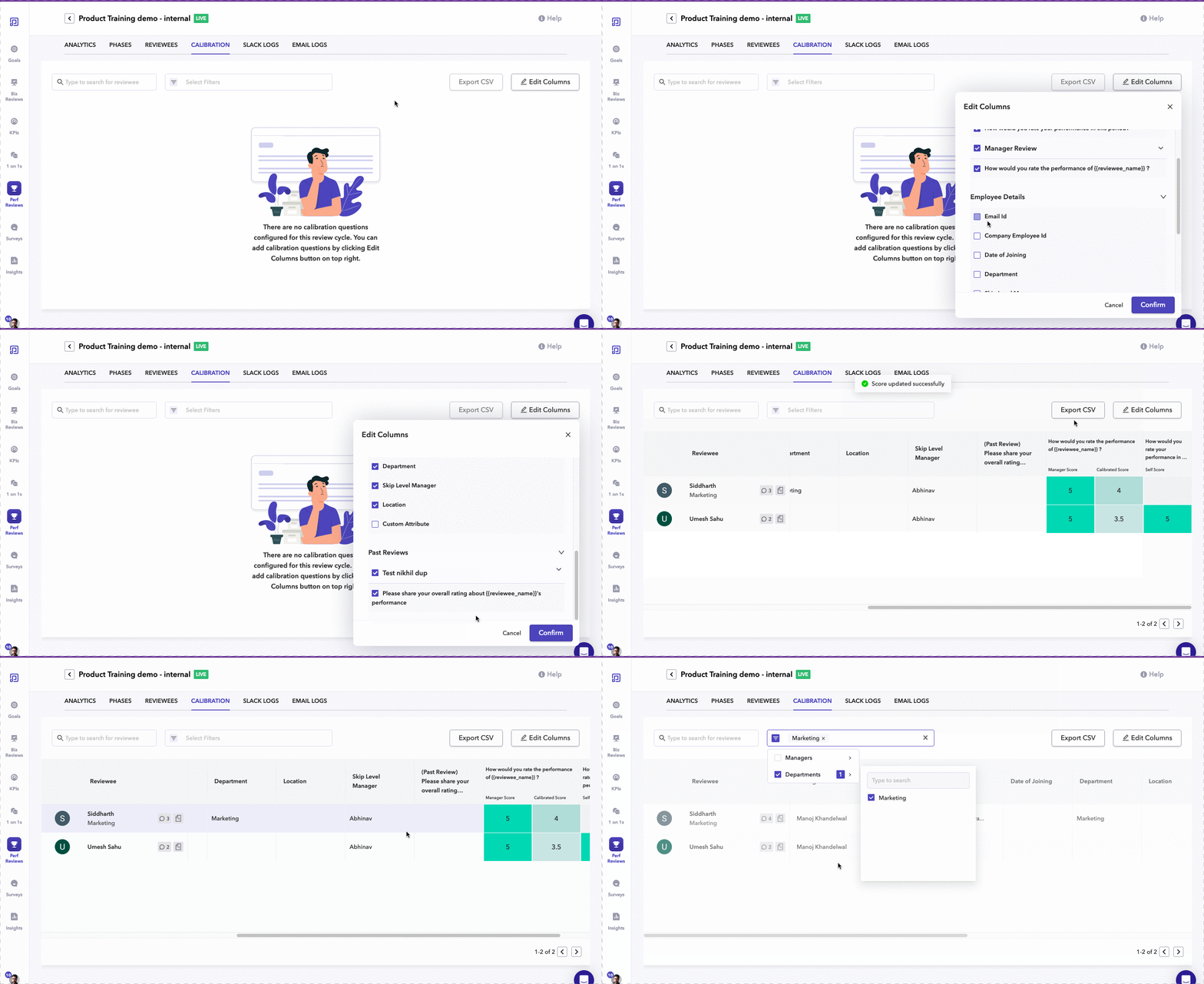
How does it work?
- Click the Edit Columns button and select the columns you want to add to the calibration table
- To download data just click on the Export CSV button, and the table which is visible will get downloaded as a CSV file
- To add calibrated scores just click on the table cells in Calibrated score columns
- You can also sort by clicking on the column headers and filter data by clicking and Selecting the Filters you want
Please try out Calibration features and let us know your feedback. For any suggestions/queries feel free to contact our Customer Success team.