Custom SMTP Configuration is Now Available
Organizations can now configure and manage their own SMTP server directly from the platform UI for all outbound emails.
What’s Included?
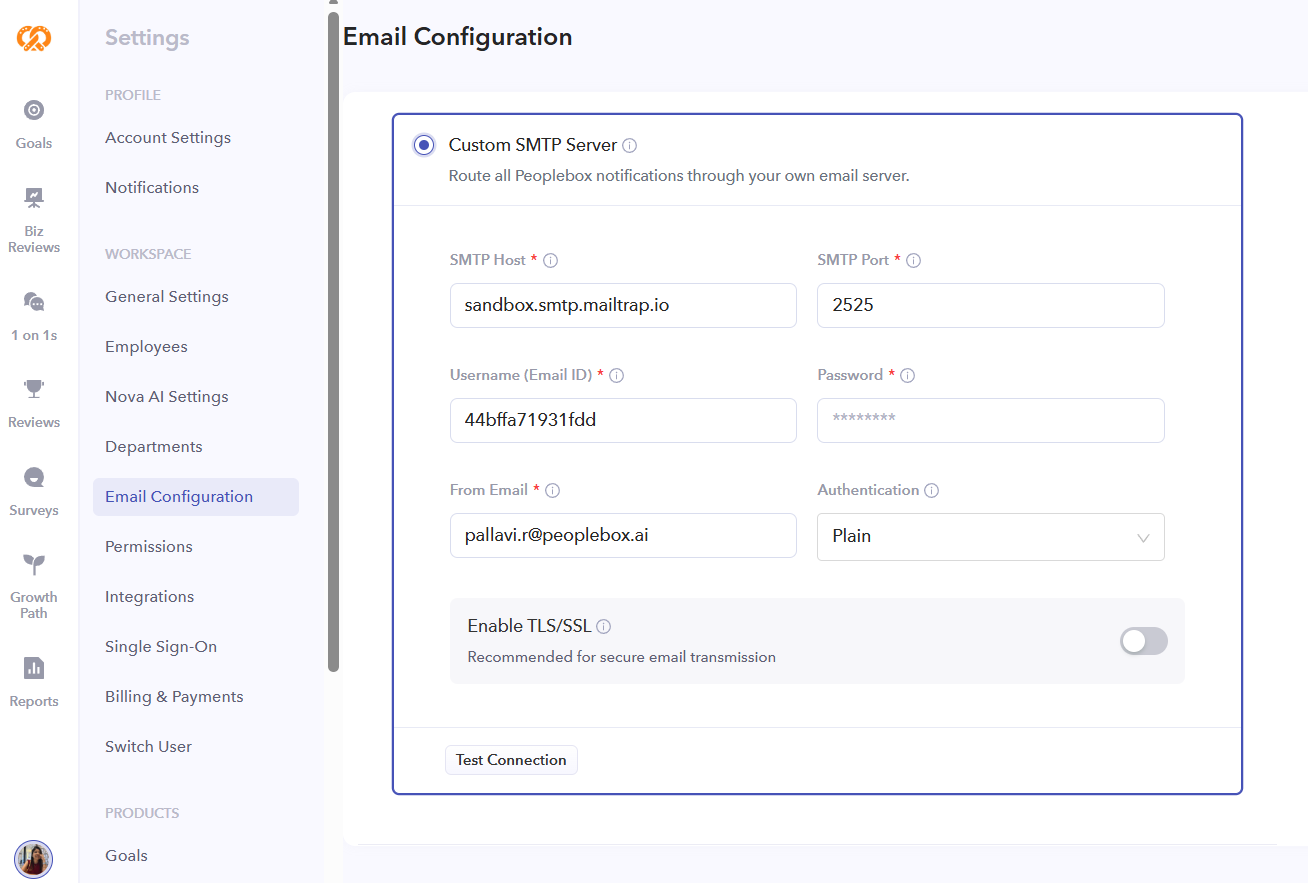
- Configure SMTP Directly from the UI: Admins can now set up: SMTP host, Port, Username and password, Authentication type, TLS/SSL encryption settings.
- Built-In SMTP Testing: Validate SMTP connectivity and credentials before enabling the configuration. Instant feedback helps identify authentication or connectivity issues early.
- One-Click Enablement: Once enabled, all outgoing emails for the account will be routed through the configured SMTP server automatically.
- Greater Control & Compliance:
- Use your organization’s mail infrastructure.
- Align with internal security and compliance policies.
- Maintain sender reputation and email monitoring within your own systems.
- Flexible Management: Admins can update SMTP settings anytime or disable custom SMTP to switch back to the default email provider.
Where to Configure?
- Navigate to: Settings → Email Configuration
- Supported configurations include: TLS/SSL encryption, Custom SMTP ports, Authentication-based SMTP providers.
⚠️Important Notes:
Once enabled, all outgoing emails will be sent through the configured SMTP server.
Incorrect credentials or connectivity issues may impact email delivery.
We recommend testing the configuration before enabling it in production.