Introducing IDP Management: A Centralized Hub for Employee Development
🌱 Growth Path
We're excited to launch IDP Management, a new admin experience designed to help organizations manage and monitor Individual Development Plans (IDPs) from a single, centralized location.
With IDP Management, admins can configure plan types, customize development frameworks, track adoption and progress across the organization, and support employee growth more effectively. The entire experience also includes full internationalization (i18n) support, enabling organizations to use IDP Management in their preferred language.
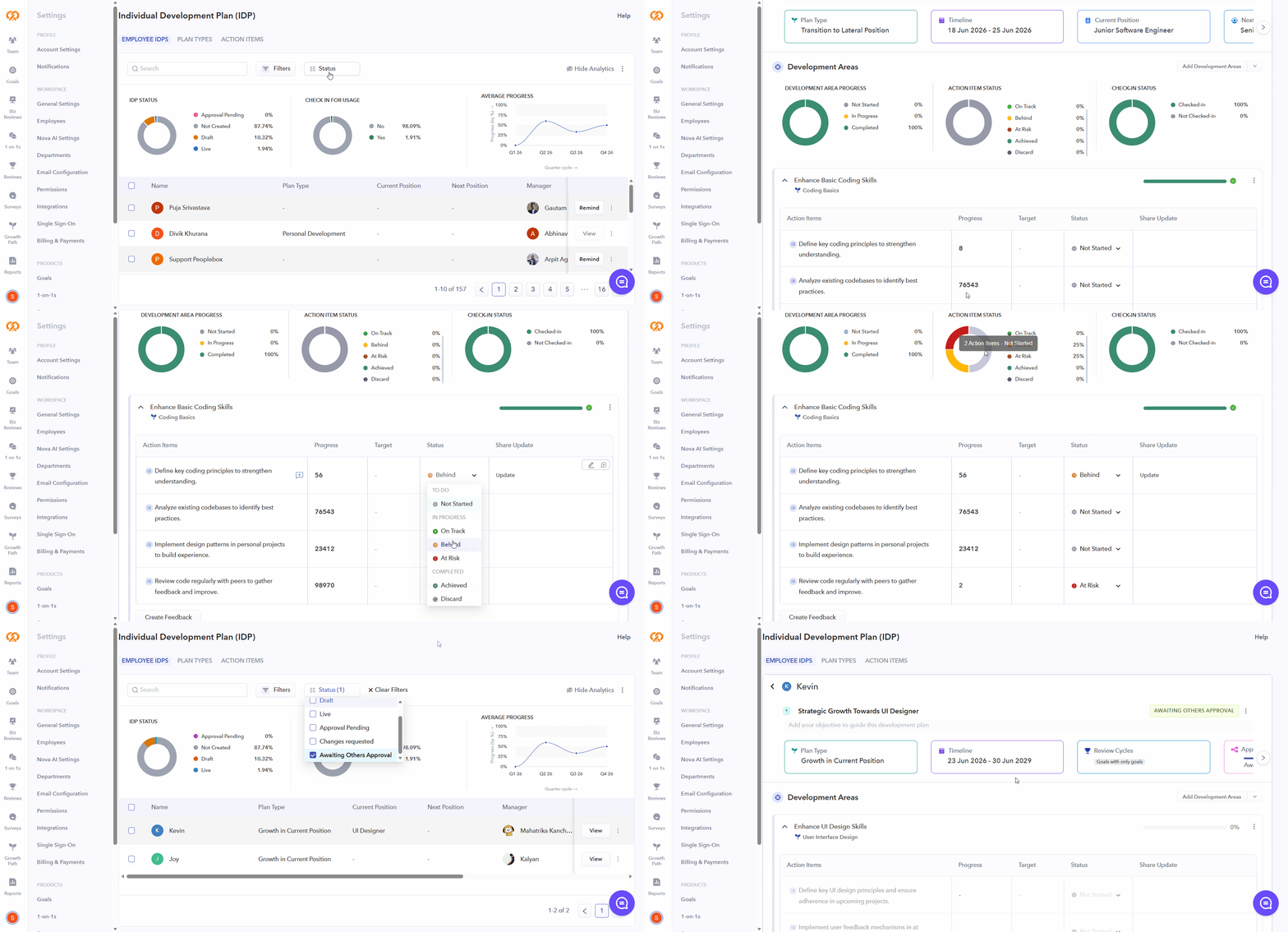
Employee IDPs Dashboard:
- View all employees and their current IDP status in a single place.
- Identify employees who have not created an IDP, have active plans in progress, or have completed their plans.
- Track closed, rejected, and completed plans to understand plan type adoption and usage trends.
- Open and review employee plans directly from the dashboard.
- Create, edit, check in on, and close IDPs on behalf of employees.
- Automatically notify employees and their managers when an admin closes a plan.
Employee Reminders:
- Send bulk reminders to employees who have not yet created an IDP.
- Target reminders to specific employee groups or the entire organization.
- Include a personalized message from the admin sending the reminder.
Dashboard Insights:
- View the distribution of IDP statuses across the organization.
- Monitor check-in activity on active development plans.
- Track development progress over time with quarterly timeline insights.

Plan Type Configuration:
- Create and manage custom IDP plan types.
- Control who can create each plan type, including employee-created and manager/admin-only plans.
- Configure plan fields such as Current Role, Next Role, and Review Cycle linkage.
- Customize plan type names, icons, descriptions, and display titles.
- Control which plan details employees can view on manager-created plans.
- Archive plan types to hide them from future plan creation while preserving existing plans.
Important Notes:
- System-defined plan types have fixed titles, icons, and descriptions, while other settings remain configurable.
- Custom plan types are fully editable.
- At least one plan type must remain active.
- When Plan Creators is set to "Managers Only," admins can configure which fields employees can view in manager-created plans.
Action Item Framework:
- Create and manage action item types used within development plans.
- Define progress types to determine how development activities are tracked.
- Create custom action item types and progress types tailored to organizational needs.
- Archive action item types and progress types to remove them from future selections while preserving existing records.
Important Notes:
- System-defined action item types and progress types cannot be edited.
- Custom action item types and progress types are fully editable.
- The Task action item type cannot be archived because it is the default action item type.
- At least one progress type must remain active.