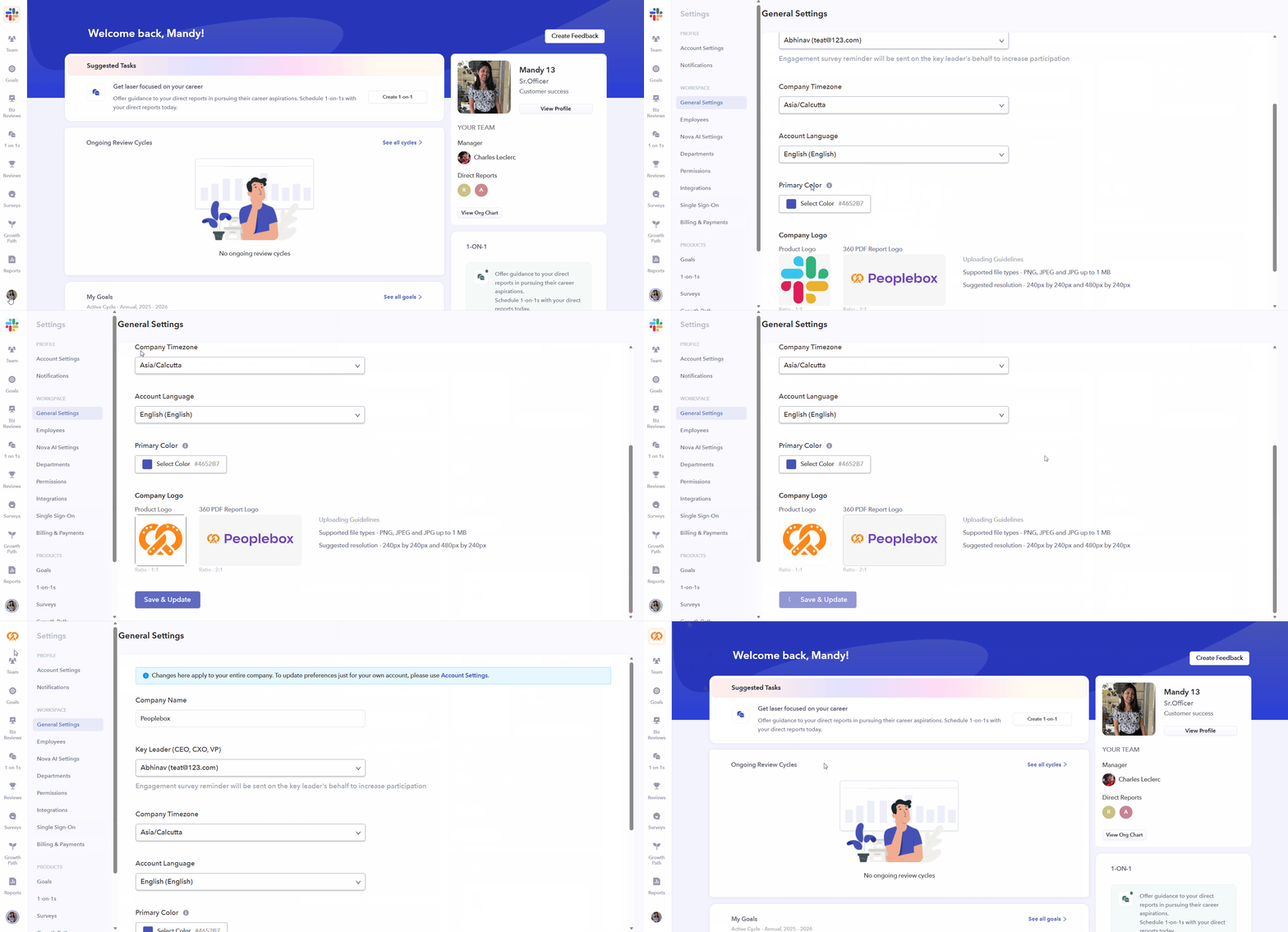
New Feature Update: Upload Company Logos from General Settings
🌎 Global
We’re excited to introduce a new feature that allows admins to upload company logos directly from General Settings, making it easier to maintain consistent branding across the platform and reports.
What’s New?
- Upload Company Logos: Admins can now upload two types of logos from Account Settings → General Settings:
- Product Logo (1:1 ratio)
- 360 PDF Report Logo (2:1 ratio)
- Product Branding in the Platform: The Product Logo will appear at the top of the platform interface, enabling organizations to showcase their branding consistently across the product experience.
- 360 Review PDF Branding: The 360 PDF Report Logo will automatically be included in downloaded 360 Review PDFs, ensuring all reports reflect your organization’s branding.
- File Validation and Error Handling:
- Supports PNG, JPG, and JPEG formats
- Maximum file size of 1MB
- Displays clear error messages for invalid, corrupted, or oversized files
- Multi-language Support: All upload validations and messages are supported in English, Spanish, and Arabic (RTL), providing a localized experience for global teams.